Sign up on Paxum. Review and instructions.

The closure of the FirstChoicepay payment system made a lot of noise. Without a doubt, it was the most convenient and fastest way to withdraw money from different webcam chats. Approximately 80% of all users who earned on the adult used it get their money. Now we need to look for an alternative and ways to withdraw your earned money. Transfer to a bank account – expensive, check – expensive and very long. The only option is paxum. Many of you have asked to review this system and show how to connect it to webcam chats. So now we will look at how to sign up on Paxum and do its review. How to connect to chats will be told in separate articles.
How to register a Paxum account
First of all, you need to go to the registration page. You can do it by clicking here. You will open the page like on the picture:
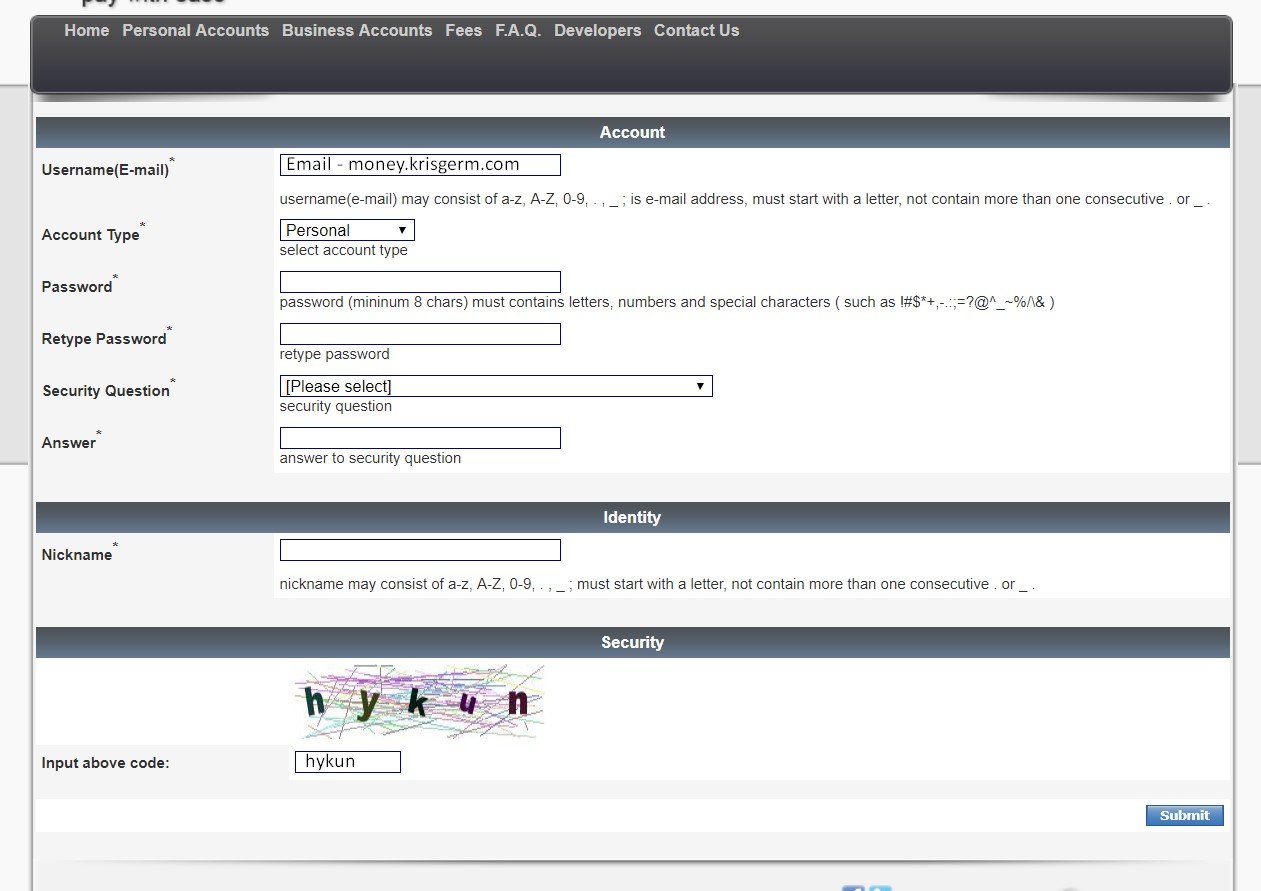
Is it worth describing each field here? It seems that everything is simple. The only point – Security question you need to choose one of the proposed questions and below give an answer to it. The answer needs to be remembered because support may require when some questions arise. And choose the type of account personal, not business.
Now that you go to the page, as in the screenshot below, you just need to go to your mail and copy the activation code. Also, you can click simply on the link in the letter and the account is automatically activated: 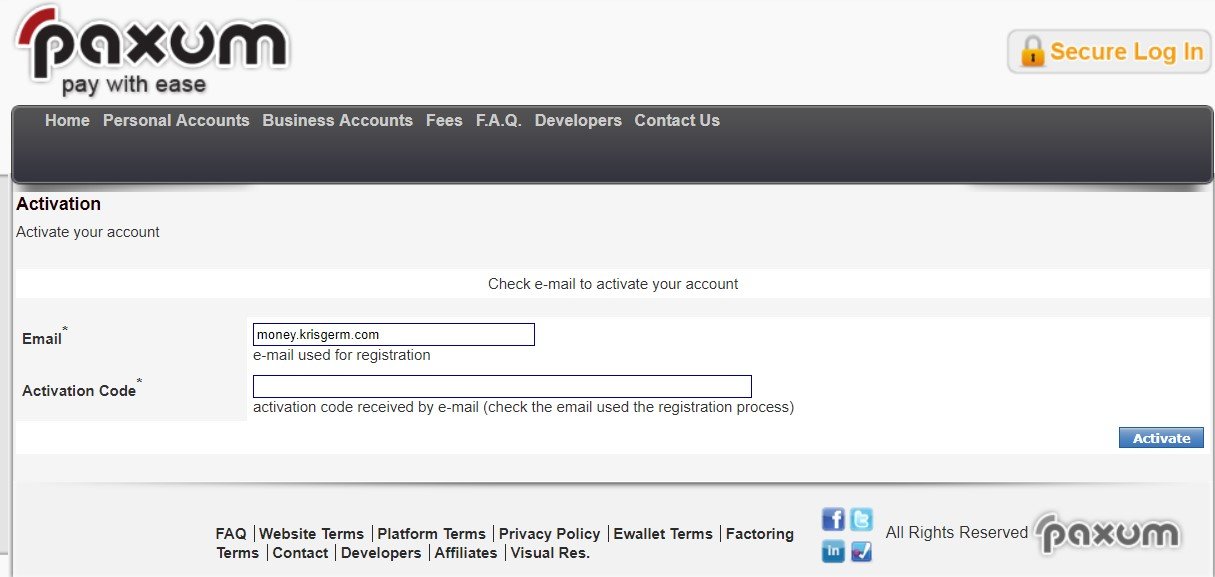 Now you will be shown on the screen a bunch of ticks and text. It tells a little bit about commissions and how payments are credited to America. Simply check all the boxes and click on Continue:
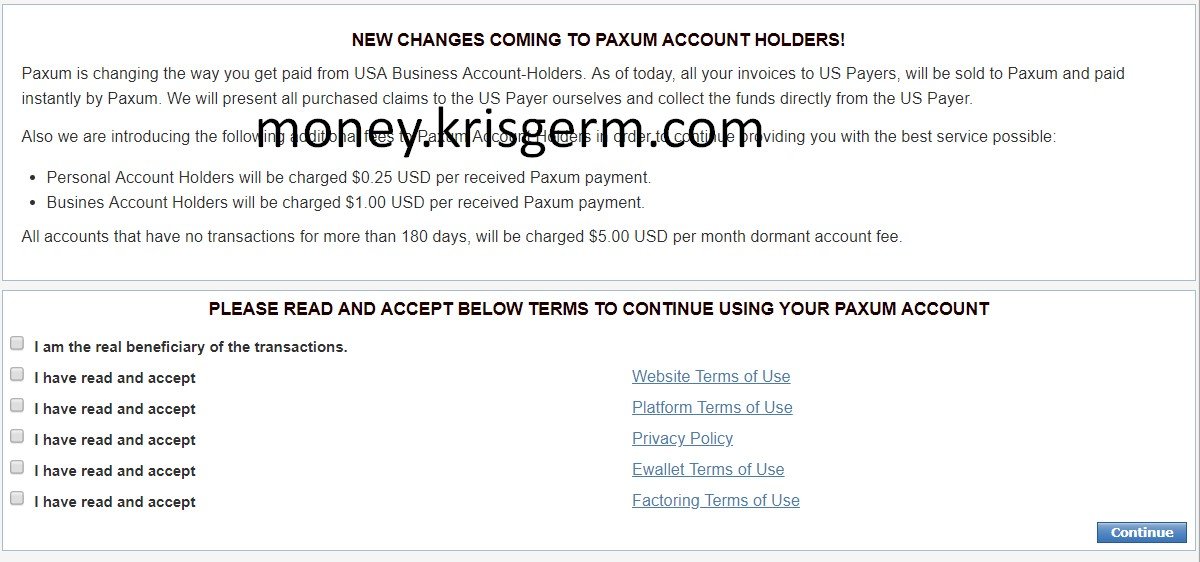
Filling user data on Paxum
Once you’ve successfully signed up on Paxum, you need to fill in your personal data. You need to enter strictly everything is true, do not invent anything. WARNING Put the address which you may verify with documents. The card can only be ordered at the verified address. If you do not live on a residence permit, then the money can be withdrawn on your card of any bank or through an exchange. Let’s see the screenshot and discuss what’s what:
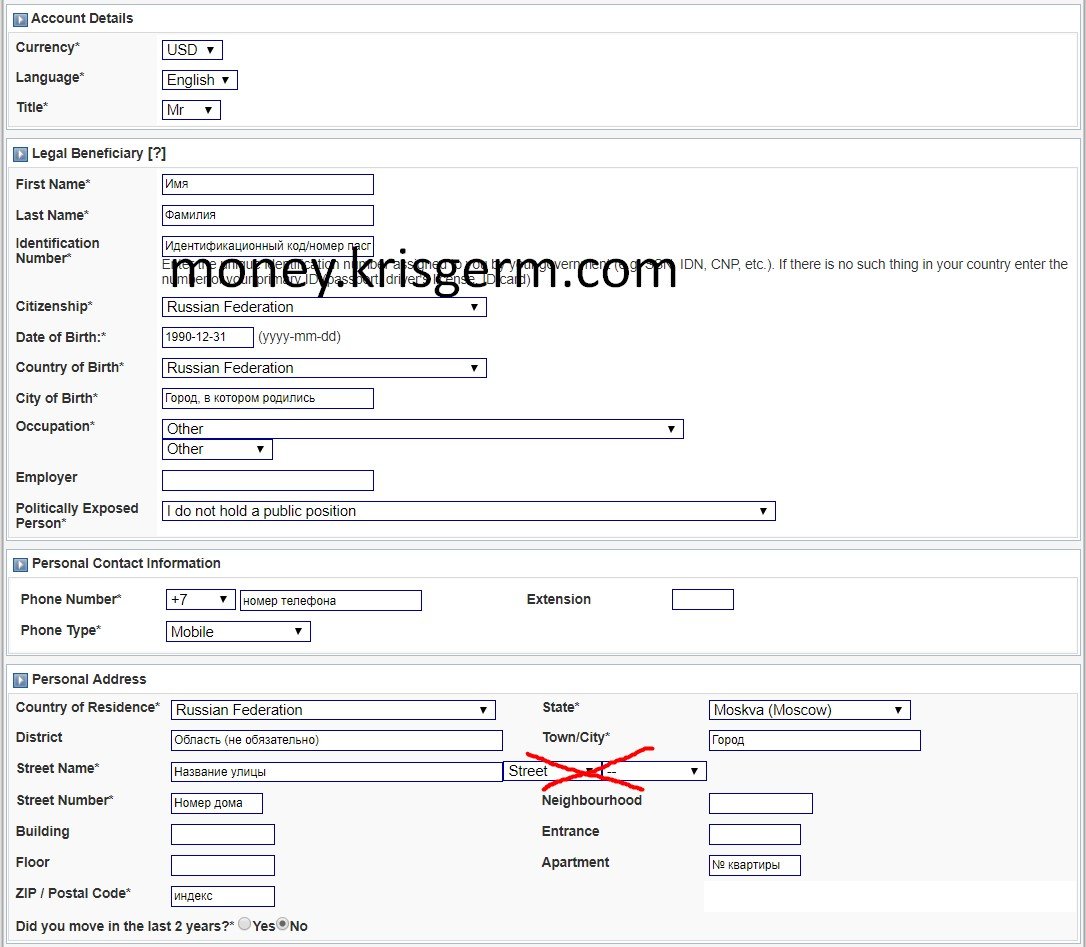
Enter all the data only by Latin symbols. And we will not disassemble all the fields, but only the most interesting. Title – Mr man, Mrs married woman, Miss unmarried woman or girl. Identification Number – taxpayer identification code or series and passport number. Citizenship – country where you live. Occupation and Politically Exposed Person – choose as on the screenshot. Did you move in the last 2 years? – have you changed your place of residence in the last two years.
After filling in all this data, two emails will arrive in the mail, which means that you sign up on Paxum has been made successfully. When you log into your account, you’ll need to verify it. This procedure takes place in two stages – verification of identity and address. Let’s take a look at how to do that.
Paxum account verification
At the very top of the page you are already waiting for this verification: 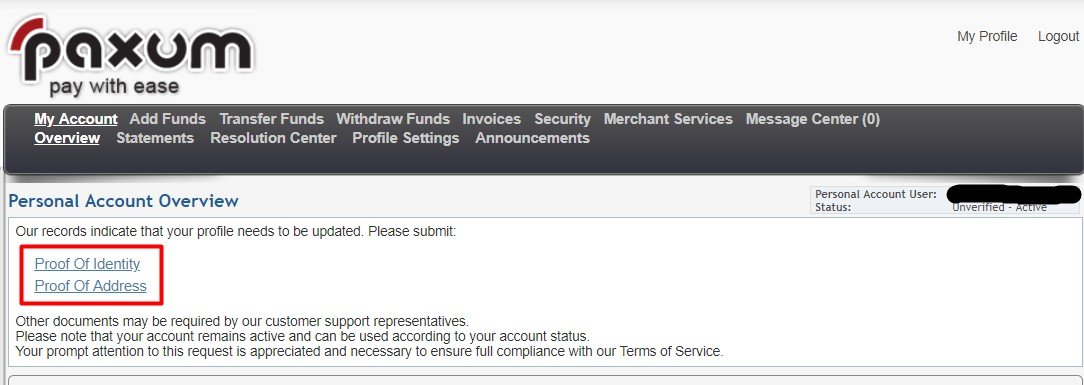
On the first link you confirm the identity, the second – your address. We recommend downloading your internal passport, not your international passport.
Proof of Identity
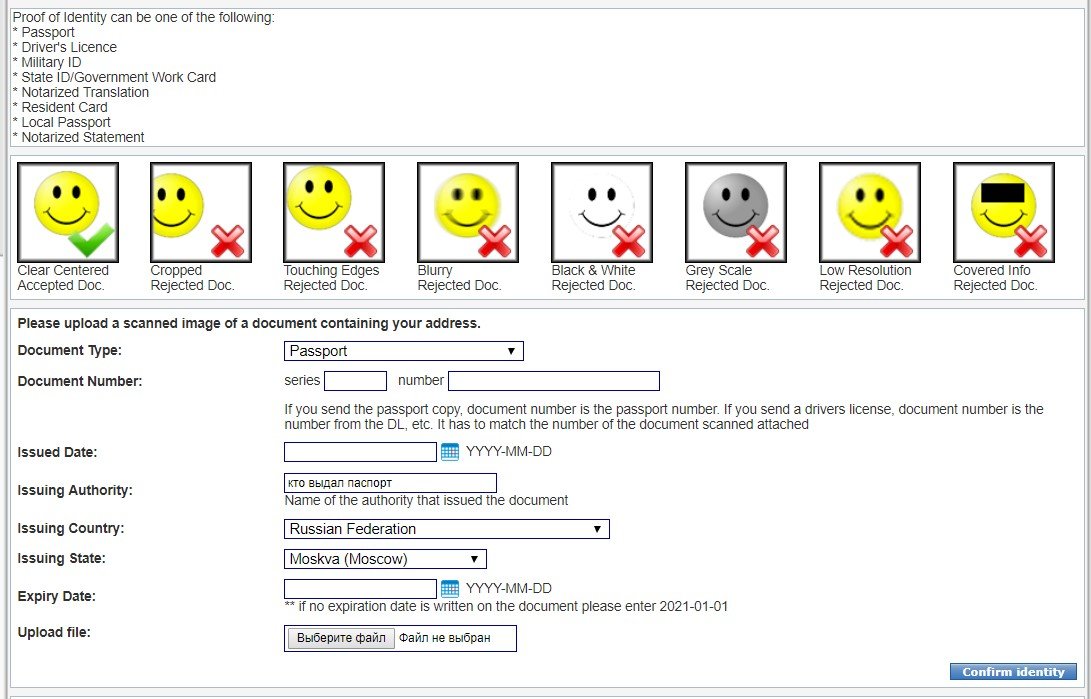
The type of document is Local passport. Issued Date is the date of issue. Issuing Authority is the authority that issued the passport. Enter all the necessary information and download a copy of the passport in good quality.
Proof Of Address
Now go to the address confirmation page. It looks like this: 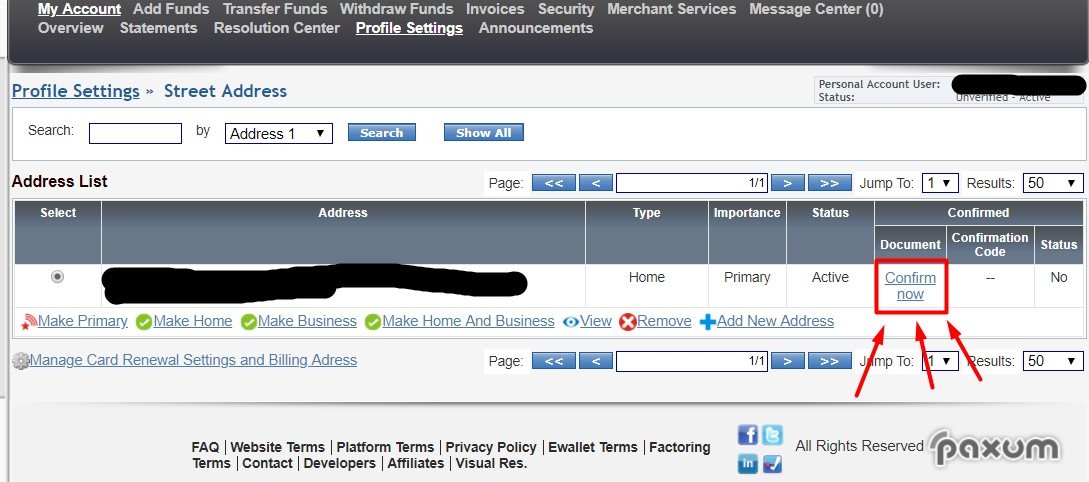
Here you need to click on Confirm now, which is highlighted in red in the picture. You’ll go to a page where you can upload your address confirmation:
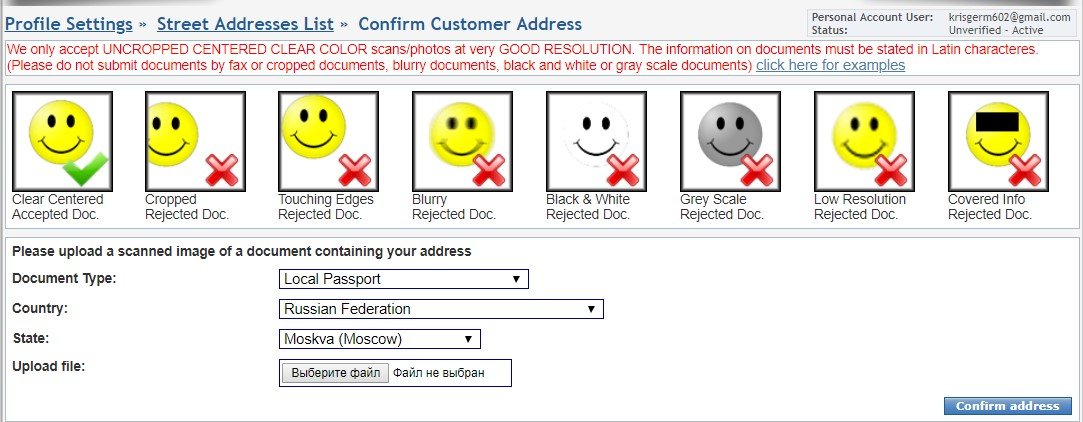
Paxum offers many ways to confirm your address, but the easiest and most reliable is to send a copy of the page of your passport with a residence permit. To do this, choose Local Passport, the country and city in which it was issued, upload the document and press the blue Confirm address button.
Now when you’ve signed up on Paxum and download all the documents, wait until the administration checks out provided information. Often they reject downloaded copies because of the slightest detail. Thus, it is impossible to use a foreign passport or driver license for identification, but to download an internal passport for an address. If you take a photo of a passport, remove the cover from it, even if it does not close anything.
Paxum Commission
Let’s first look at the principle of Paxum. All the money that you withdraw from other sites on this payment system does not come to the card immediately, but only to the account. This gives a good advantage – money from the account can be transferred to another account, withdraw it to any card of any bank and just get your money through the exchange. Therefore, those who cannot or do not want to order a card from Paxum, has other opportunities to cash out. In this regard, paxum charges different commissions for different ways of withdrawal.
General commissions
Monthly account service is free. Maintaining an account that has not been used for more than 6 months is $5 per month.
Commissions for replenishing the account of your account
These commissions are not exactly important for those who wanted to register Paxum to withdraw money from other sites, by the way, consider the most important.
Topping up your account from your dollar bank account is $50. Top-up account from your euro bank account – $10.
Commissions for transferring funds from the account
Transfer of funds to another account (withdrawal of money from other sites and chats) – $0.25. Escrow Transfer – $0.25. Transfer to your bank account in dollars – $50.00, in euros – $40. Withdrawal on your card of your bank – $6.00 and 3%. Withdrawal of funds on someone else’s card (card is not on your name) – $6.00 and 5%.
Paxum Card Commission
The card is issued for free. Annual card service – $44.95.
Transfer of funds from your account to your card – $0.25.
Withdrawal of dollars in cash at an ATM – $2.00. Cash withdrawal in another currency is $2.00, the ATM conversion rate.
Shopping in shops, cafes, etc. in any currency – without commission.
Rejected operation – $0.50.
Checking the balance through an ATM – $0.50. Change the pin – $1.00. Card reissue – $44.95. Card delivery – regular mail – free, accelerated – $95.00. To appeal the transaction is $40.00.
How to connect your card to Paxum
It is good if you managed to register Paxum. Now you need to connect your card to this system. Not the Paxums card, but your own from your bank. It is not difficult to do it. In the top menu, find Profile Settings and on the page that opened – Credit Cards. After that, find and click on Add Card:
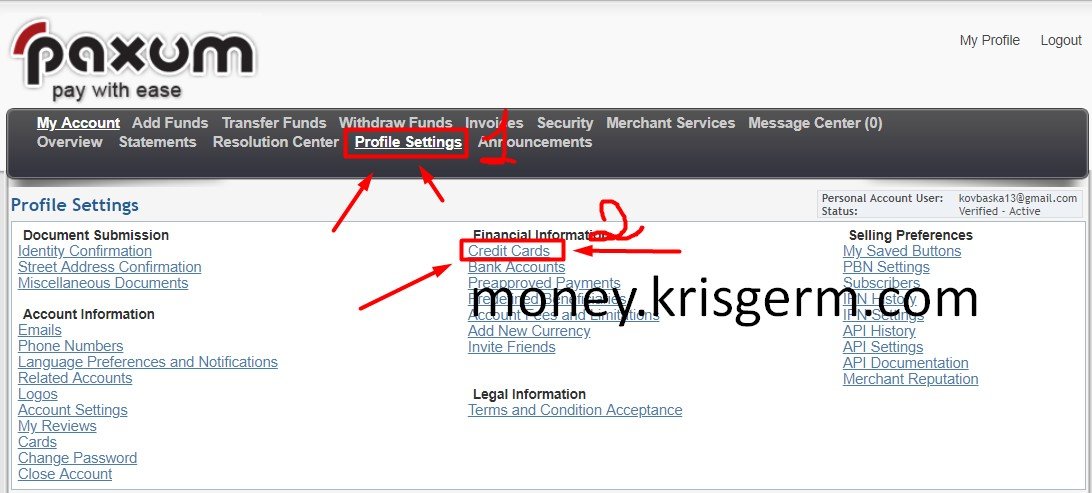
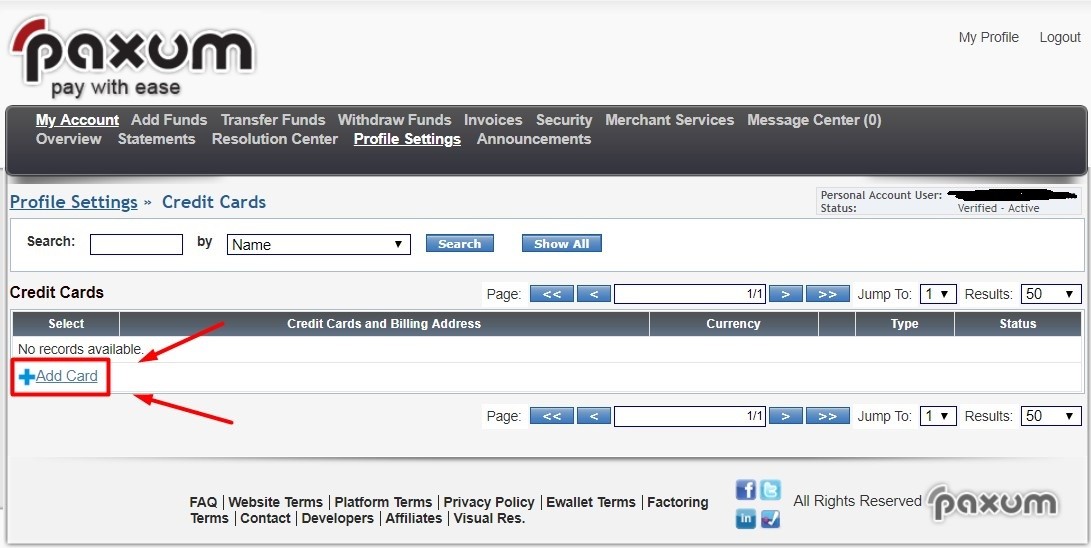
If you’ve done everything as described above, you’ll see a page to add your Paxum card. Enter its data and save the settings.
Withdrawal money to your card
You can also withdraw funds from the Paxum to your external card. You don’t have to order their card. To do this, follow the instructions as in the screenshot:
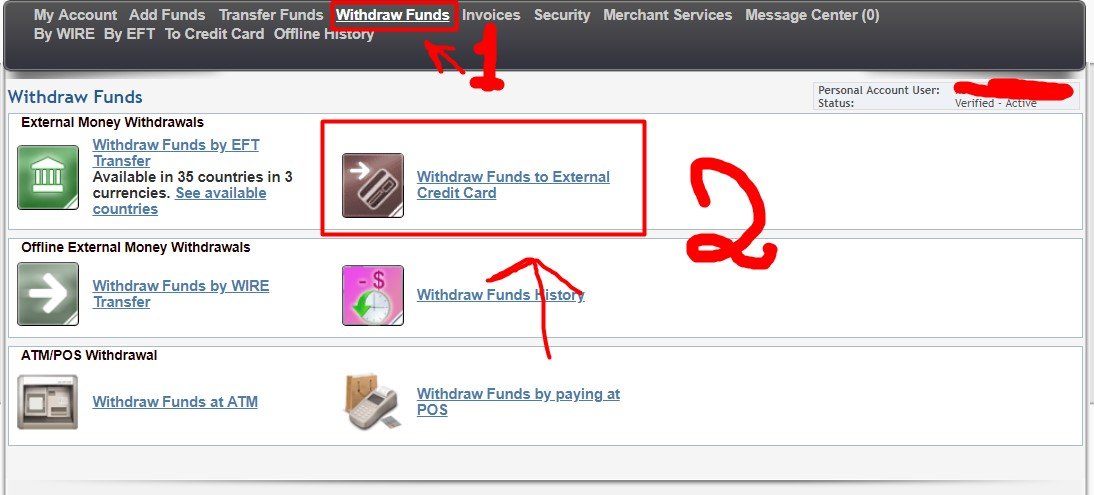
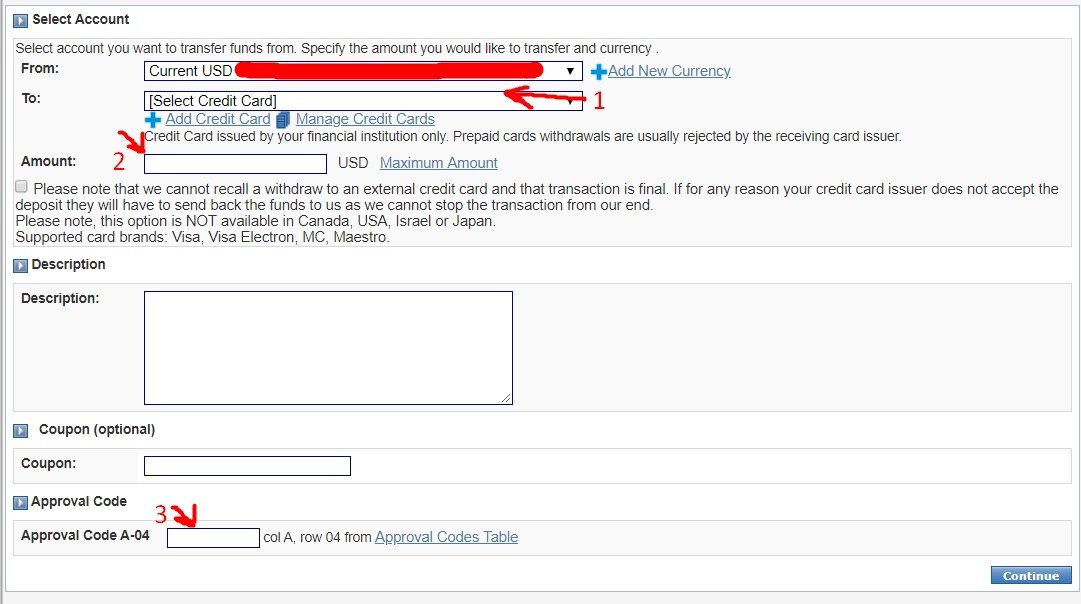 We’ll only discuss the second screenshot. At first, choose all the same. So:
- Choose a card to charge.
- The amount of withdrawal.
- Transaction confirmation code. This code came to your mail immediately after registration in the Paxum.
Now we have only considered how to register for Paxum, its commission and how to tie the already finished card. Ask more questions in the comments and, if necessary, supplement the article with answers to your questions.
Read also




Questions and answers
No questions yet. Ask the first one